


Pick the integration pattern that matches your high-level requirements, then implement it with OAuth client-credentials, a dedicated integration user and a middleware control plane. That order matters. Teams that pick a tool first and force the requirements to fit it end up with brittle point-to-point wiring that nobody wants to own two years later.
Three moves separate a resilient Salesforce integration from a fragile one. First, capture your high-level requirements (HLRs) before writing a line of code: what’s being integrated, who’s waiting on the response, and how much data volume you’re actually moving. Second, decide synchronous or asynchronous early, since that single choice shapes everything downstream, from API selection to error handling. Third, provision a dedicated integration user with a scoped connected app rather than reusing a human login.
Copy this into your next architecture kickoff:
- Document HLRs: timing, volume, transactionality, failure tolerance
- Choose sync vs async before selecting any API or middleware
- Create a dedicated Salesforce integration user and connected app with least-privilege permission sets
- Decide early whether a middleware control plane is justified at your scale
Pro Tip: If you can’t answer “what happens if this call fails at 2 a.m. with nobody watching,” you haven’t finished your HLRs yet.
Key Takeaways
Effective Salesforce integration depends on choosing a pattern from documented requirements first, then securing it with least-privilege OAuth and a governed middleware layer.
| Point | Details |
|---|---|
| Pattern before tool | Map HLRs (timing, volume, failure tolerance) to a pattern before selecting any API or platform. |
| Match API to need | Use REST for standard CRUD, Bulk API for large loads, and CDC/Platform Events/Pub/Sub for streaming. |
| Secure with least privilege | Provision a dedicated integration user, scoped connected app, and OAuth client credentials per application. |
| Build in idempotency | Use external IDs and upsert semantics so retries never create duplicate records. |
| Prefer middleware at scale | A centralized control plane beats point-to-point wiring once integrations multiply past a handful. |
| Partner for governance | Seattlesoftwaredevelopers designs integrations pattern-first with security and operational runbooks built in from the start. |
Table of Contents
- What Are the Core Salesforce Integration Patterns?
- How Do You Choose the Right Integration Pattern?
- Which Salesforce API Should You Use for Each Job?
- What Are the Best Authentication Practices for Salesforce Integrations?
- How Should You Design Data Contracts and Avoid Duplication?
- Should You Build Middleware or Connect Point-to-Point?
- How Do You Handle Failures Without Losing or Duplicating Data?
- How Do You Plan for Salesforce API Limits and Scale?
- What Testing and Deployment Practices Keep Integrations Stable?
- How Do You Monitor Integrations for Operational Readiness?
- What Should Be in Your Pattern-Selection Checklist?
- What Do Real Salesforce Integration Projects Get Wrong?
- Frequently Asked Questions
- Sources
What Are the Core Salesforce Integration Patterns?
Salesforce’s own architecture guidance groups integrations by intent and timing, and that framing is the fastest way to reason about any new requirement. Synchronous patterns block the caller and wait for a response; asynchronous patterns decouple the systems entirely and process on their own schedule. Six patterns cover nearly everything you’ll build.
Request & Reply is synchronous: a caller sends a request and waits. Use it for real-time lookups, like checking a customer’s balance before showing a support agent a screen. It’s simple to build and easy to debug, but it creates temporal coupling. If Salesforce is slow, your caller is slow too.
Fire-and-Forget sends a message and moves on without waiting for confirmation. Good for logging, notifications, or non-critical updates where you can tolerate occasional loss.
Batch Data Sync moves large volumes on a schedule (nightly, hourly) rather than per transaction. It’s the workhorse for data warehouse feeds and legacy system reconciliation.
Remote Call-In lets external systems invoke Salesforce APIs directly, typically for CRUD operations initiated outside the platform, like a mobile app updating a case.
Data Virtualization avoids replication altogether by querying source data live through Salesforce Connect, useful when data changes too frequently to justify a copy.
Publish/Subscribe broadcasts events to any number of listeners asynchronously, ideal for order status changes, inventory updates, or anything with multiple downstream consumers.
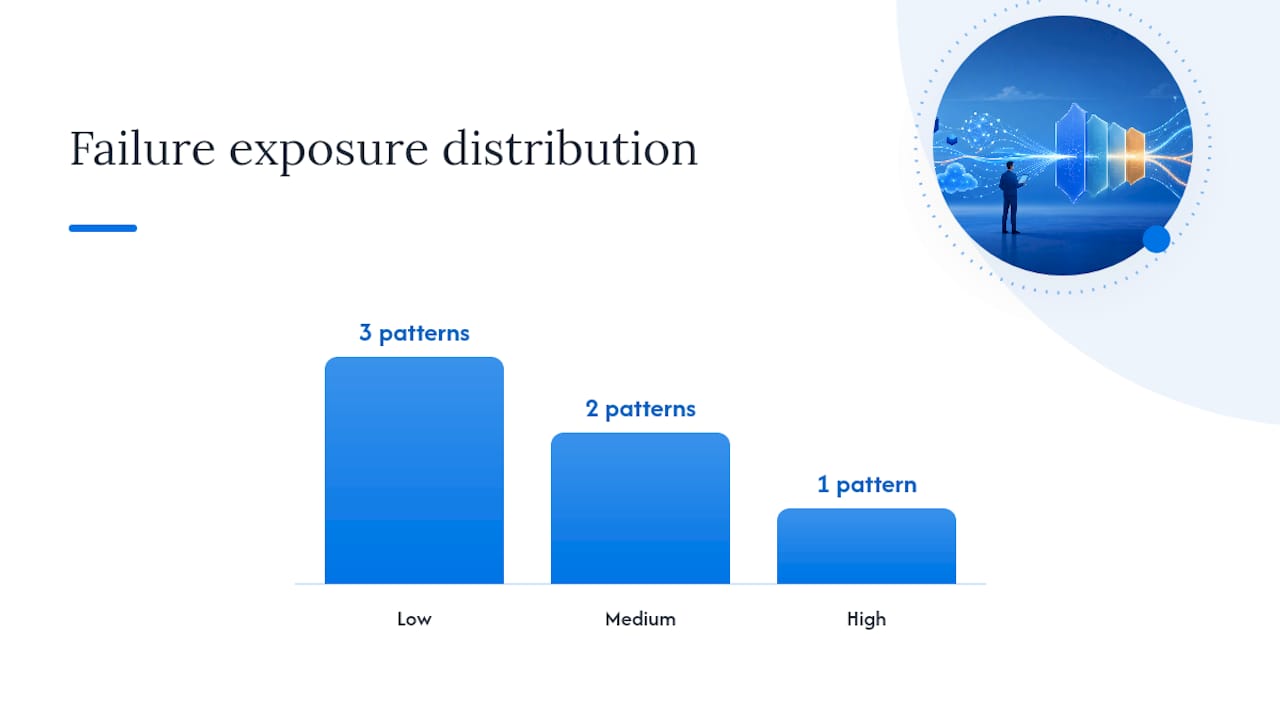
| Pattern | Timing | Best fit | Complexity | Failure exposure |
|---|---|---|---|---|
| Request & Reply | Sync | Real-time lookups | Low | High (caller blocked) |
| Fire-and-Forget | Async | Logging, notifications | Low | Low (accepts loss) |
| Batch Data Sync | Async | Large volume, scheduled | Medium | Medium (retry window) |
| Remote Call-In | Sync | External CRUD triggers | Medium | Medium |
| Data Virtualization | Sync | Live, low-latency reads | Medium | Low (no stale copy) |
| Publish/Subscribe | Async | Multi-consumer events | High | Low (durable queue) |
How Do You Choose the Right Integration Pattern?
Start with the requirement, not the tool. Salesforce’s own guidance is blunt about this: align patterns to use cases first, never pick a technology because it’s familiar or already licensed. The fastest way to get this wrong is to let last quarter’s MuleSoft license or a developer’s REST API comfort zone drive the architecture instead of the business problem.
Work through five questions before touching a design document:
- What’s being integrated, and in which direction? A one-way data feed behaves nothing like a bidirectional sync with conflict resolution needs.
- Who’s waiting for the result? A human staring at a screen needs sync. A batch job running overnight can wait.
- What’s the acceptable latency? Milliseconds, minutes, or hours changes everything about the pattern and the API underneath it.
- What’s the failure tolerance? Can you lose a record, or does every transaction need a guaranteed, auditable outcome?
- What’s the data volume? Ten records a day and ten million records a day are different engineering problems, not the same one at different scale.
Once you’ve answered those, a simple selection matrix does most of the remaining work.
| HLR signal | Timing | Recommended pattern candidates |
|---|---|---|
| User waiting on screen, low volume | Sync | Request & Reply, Remote Call-In |
| Multiple systems need the same event | Async | Publish/Subscribe |
| Nightly reconciliation, large volume | Async | Batch Data Sync |
| Live data, no tolerance for staleness | Sync | Data Virtualization |
| Non-critical side effect | Async | Fire-and-Forget |
Two missteps show up constantly in reviews. The first is tool-first decisionmaking, where a team defaults to whatever integration platform they already pay for regardless of fit. A message queue product bought for another project gets bent into shapes it was never designed for, and six months later nobody remembers why the retry logic is so convoluted.
The second is over-replication. Teams copy entire objects into Salesforce “just in case” a future report needs the field, then spend years maintaining sync jobs for data nobody queries. If the use case tolerates a live query instead of a stored copy, virtualization or a light Remote Call-In pattern is almost always cheaper to operate than a replicated dataset, even though it looks like more upfront design work.
Write the decision down. An Architectural Decision Record that states the HLRs, the pattern chosen, and the rejected alternatives saves the next engineer from re-litigating the same debate a year later when the original context is gone.
Which Salesforce API Should You Use for Each Job?
Pick the narrowest API that satisfies your requirement rather than defaulting to whatever’s most familiar. Salesforce’s developer documentation lays out four main lanes: REST, SOAP, Bulk API, and the Pub/Sub, Platform Events, and Change Data Capture family for event-driven work.
REST API handles standard CRUD and metadata access synchronously. It’s the default choice for most integrations: lightweight, well documented, and easy to test with a curl command during setup, as shown in Salesforce’s own REST API quick-start guide.
SOAP API still shows up in older enterprise environments that standardized on WSDL-based contracts years ago. Unless a legacy system mandates it, REST is the better default for new work.
Bulk API is built for large data volumes, generally anything crossing tens of thousands of records, processed asynchronously in batches. Loading a large nightly file through REST would burn through API allocations fast; Bulk API is designed exactly for that job.
For event-driven architecture, three tools solve different problems, and mixing them up is the most common mistake developers make:
- Change Data Capture (CDC) streams canonical record deltas, use it when a downstream system needs to know exactly what changed on a standard or custom object.
- Platform Events carry custom business events with your own payload shape, use them when the event is a business concept (like “order shipped”) rather than a raw field change.
- Pub/Sub API is the transport layer both CDC and Platform Events run over, giving you a single, high-throughput gRPC-based subscription model instead of managing multiple listener types.
A misconception worth correcting directly: streaming is not automatically the better choice just because it feels modern. If a nightly batch reconciliation solves the business problem, a CDC pipeline adds operational overhead for no real gain. Match the API to the HLR, not to what feels cutting-edge on a whiteboard.
A common combined pattern looks like this: CDC detects a change in Salesforce, a middleware layer picks up the event, enriches it with data from another system, then calls Bulk API to upsert the result back. Each piece does one job, and each is independently testable, which matters when a callout starts failing at 3 a.m. and you need to isolate the layer at fault.
What Are the Best Authentication Practices for Salesforce Integrations?
Use OAuth client-credentials with a dedicated integration user, never a shared human login. Salesforce recommends this exact combination for server-to-server integrations: a Salesforce Integration User license, a Minimum Access – API Only Integrations profile, and OAuth client credentials on the connected app. This isn’t a minor configuration preference. It’s the difference between an audit trail you can actually use during an incident and a login history full of ambiguous entries you can’t attribute to a specific system.
The least-privilege checklist that matters most in practice:
- One integration user per external application, never one shared user across five connected systems
- Permission sets scoped to exactly what that integration touches, not the org’s default profile
- A dedicated connected app per integration, with its own client ID and secret
- Named Credentials instead of hardcoded endpoint URLs and tokens in code or configuration files
- IP restrictions on connected apps where the calling system has a stable, known address range
- Secret rotation on a defined schedule, not “whenever someone remembers”
- Audit logging enabled and routed somewhere your team actually reviews
This structure pays off the moment something goes wrong. When an integration user’s activity is isolated from every other login, tracing a bad write back to its source takes minutes instead of a multi-team investigation across shared credentials. The Integration User approach also avoids consuming standard user licenses, which adds up quickly once you’re running a dozen integrations against one org.
Pro Tip: Store client secrets in a secrets manager, never in a configuration file checked into source control, and treat any secret that’s ever touched a shared Slack channel or ticket as compromised. Rotate it immediately rather than hoping nobody saw it.
Security work here is not a one-time setup step. Reviewing your approach to security in custom software development on a recurring cadence, not just at launch, is what keeps an integration audit-ready a year after the original team has moved on to other projects.
How Should You Design Data Contracts and Avoid Duplication?
Decide upfront whether data gets replicated or virtualized, because that choice determines your entire maintenance burden downstream. Salesforce’s own guidance is direct on this point: resist unnecessary replication and prefer virtualization or zero-copy patterns when the user experience can tolerate a live query instead of a stored copy. Replication makes sense when you need offline access, complex reporting, or sub-second local queries. It’s expensive to maintain otherwise.
Idempotency is where most integration bugs actually live, not in the happy path. Build every write operation so running it twice produces the same result as running it once:
- Use external IDs on every upserted object so retries don’t create duplicates
- Design event payloads to carry enough context for a consumer to detect and skip a repeat delivery
- Apply upsert semantics rather than separate insert and update logic wherever the API supports it
- Build explicit deduplication keys into batch jobs that reconcile large datasets
Mapping and transformation logic deserves the same rigor as the code that calls the API. A canonical data model, one shared shape that every integration maps to and from, prevents each new connector from inventing its own field names and units. Version your schemas explicitly, and preserve provenance metadata (source system, timestamp, transaction ID) on every record so a data quality issue can be traced back to its origin instead of triggering a guessing game across three teams.
For large-scale ingestion, know your connector limits before you design around them. The Amazon S3 connector supports up to 100 million rows or 50 GB per object under Data 360 guidance, and a schema file serves as the canonical contract for what’s being ingested. Treat that schema file the same way you’d treat an API contract.
Pro Tip: Put your mapping rules under version control and run contract tests against them in CI. A silently changed field mapping is one of the hardest bugs to catch in production because the integration doesn’t fail, it just quietly writes the wrong value.
Should You Build Middleware or Connect Point-to-Point?
Prefer a centralized control plane over custom point-to-point wiring once you’re running more than a handful of integrations, as recommended by Salesforce Commerce Cloud SEO Automation guidance. Salesforce’s architecture guidance recommends existing middleware, whether an ESB, ETL platform, or a tool like MuleSoft, because it increases reusability and governance while lowering long-term total cost of ownership compared to a growing web of direct connections.

Point-to-point feels faster at first. Two systems, one connection, done. The problem shows up at integration number six, when every new connection multiplies the number of pairwise relationships you have to test, secure, and monitor independently. A control plane centralizes transformation logic, retry policy, and observability in one place instead of scattering slightly different versions of the same logic across a dozen codebases.
| Approach | Setup effort | Long-term cost | Governance | Best fit |
|---|---|---|---|---|
| Point-to-point | Low | High (grows exponentially) | Fragmented | 1 to 3 simple integrations |
| Lightweight orchestration/serverless | Medium | Medium | Centralized, lightweight | Mid-size teams, moderate volume |
| Full middleware (ESB/ETL/MuleSoft) | High | Low (amortized) | Strong, policy-enforced | Enterprise scale, many integrations |
The sizing question is really about count and complexity, not company size alone. A three-person startup with one clean integration doesn’t need an enterprise service bus. A healthcare or finance organization running fifteen integrations across legacy systems, each with its own compliance requirement, almost certainly does, and that’s exactly the kind of enterprise software collaboration challenge where a control plane earns its cost quickly.
Whichever direction you choose, four design dimensions are non-negotiable regardless of scale:
- Observability across every hop, not just at the Salesforce edge
- Retry semantics defined once, applied consistently everywhere
- Idempotency built into the transport layer, not bolted onto each individual integration
- Policy enforcement for security and compliance applied centrally rather than re-implemented per connection
How Do You Handle Failures Without Losing or Duplicating Data?
Distinguish transient failures from permanent ones before you write any retry logic, because treating them the same way is how integrations silently lose data or double-process it. A transient failure, a timeout, a rate limit, a brief network blip, deserves a retry. A permanent failure, a malformed record or a validation rule rejection, needs a human or a compensating process, not five more automatic attempts at the same doomed call.
Exponential backoff is the standard retry strategy: wait longer between each attempt (1 second, 2, 4, 8) so a struggling downstream system gets breathing room instead of a hammering retry storm. Pair it with a circuit breaker that stops calling a dependency altogether after a threshold of failures, so one degraded system doesn’t cascade into your entire integration layer.
When retries are exhausted, the message shouldn’t disappear. A dead-letter queue captures anything that failed after all retry attempts, preserving the payload for inspection and manual reprocessing instead of quietly dropping it. Pair that with a retry ledger, a record of what was attempted, when, and why it failed, so your team can diagnose patterns instead of investigating each failure from scratch.
A practical operational playbook for a failed record:
- Log the failure with full payload and error context, not just a status code.
- Classify it: transient (retry per backoff policy) or permanent (route to dead-letter queue).
- Alert a human only after retry budget is exhausted, not on the first failure.
- Reprocess from the dead-letter queue using the same idempotency key, never a fresh insert.
- Close the loop: confirm the record landed correctly and mark the ledger entry resolved.
For operations that touch multiple systems, a compensating transaction undoes a partial success when the full operation can’t complete: if step two of a three-step order flow fails, step one needs an explicit rollback action, not a silent orphaned record. Design that rollback logic at the same time you design the happy path, not as an afterthought once something has already broken in production.
How Do You Plan for Salesforce API Limits and Scale?
Test throughput against your actual production SLA targets before launch, not after the first real spike exposes a bottleneck. Every Salesforce org has API request allocations and concurrent request limits, and hitting them mid-batch is one of the most common causes of a failed nightly job. Bulk API exists specifically for large data volumes, and routing high-volume loads through it instead of REST avoids burning through your daily API allocation on record-by-record calls.
Batching and chunking are the core techniques for staying inside those limits. Break large jobs into sized chunks rather than one massive payload, and add a buffering layer between a bursty source system and Salesforce so incoming spikes don’t translate directly into a wall of simultaneous API calls. Backpressure handling, deliberately slowing ingestion when the downstream system signals it’s near capacity, is what keeps a traffic spike from becoming an outage.
Watch these signals in production, not just during load testing:
- API request consumption as a percentage of your daily allocation
- Concurrent request count against your org’s limit
- Bulk API job completion time versus batch window
- Pub/Sub and CDC event backlog depth
- Error rate broken out by error type, not just a single aggregate number
For large data volume (LDV) scenarios specifically, native connectors handling up to 100 million rows or 50 GB per object under Data 360 patterns are worth evaluating before building a custom chunking solution from scratch. Building your own batching layer for a volume that a native connector already handles is a common way teams spend weeks solving an already-solved problem.
What Testing and Deployment Practices Keep Integrations Stable?
Use sandboxes deliberately, not as an afterthought before a release. A dedicated integration sandbox lets you validate authentication, payload shapes, and error handling against something closer to production data volume than a bare developer org can offer. Mock services for external dependencies let your team test failure scenarios (timeouts, malformed responses) without waiting for a third-party system to actually misbehave.
Contract tests matter more here than in most software categories, because an integration has two independent teams on either end who can each ship a breaking change without warning the other. A contract test verifies the API shape your consumer expects still matches what the producer delivers, catching a breaking field rename before it reaches production instead of after.
- Define the contract (schema, required fields, versioning rules) before implementation starts.
- Write contract tests that run in CI on every change to either side of the integration.
- Use a sandbox that mirrors production configuration for integration-level testing.
- Version schemas and event payloads explicitly; never silently change a field’s meaning.
- Gate deployment on passing contract tests, not just unit tests.
A quick reference for matching test type to integration pattern:
- Sync (REST/SOAP): contract tests plus integration tests against a sandbox
- Async (Pub/Sub, Platform Events, CDC): event schema validation plus consumer replay tests
- Batch: volume tests against realistic data sizes plus idempotency verification on reruns
How Do You Monitor Integrations for Operational Readiness?
Instrument every integration to answer one question fast: is this working right now, and if not, why? Track latency, error rate, throughput, dead-letter queue depth, and retry rate as your baseline metric set, and attach a correlation ID to every transaction so a single request can be traced across every system it touches. Without that ID, diagnosing a failure that spans Salesforce, middleware, and a downstream system turns into cross-referencing timestamps by hand.
A minimal runbook for each integration should include the dependency’s SLA (what response time and uptime you can actually expect from it), alerting thresholds tied to real business impact rather than arbitrary round numbers, and a clear escalation path naming who gets paged when the dead-letter queue starts filling up.
Prioritize these in your first monitoring pass:
- Error rate by integration and by error type, not one blended number
- Dead-letter queue depth, alerted the moment it starts growing instead of at some threshold
- End-to-end latency from source event to Salesforce write confirmation
- Retry rate trend, since a slow climb often signals a degrading dependency before it fully fails
- API allocation consumption against your daily limit
A runbook doesn’t need to be elaborate to be useful. A one-page document naming the on-call owner, the known failure modes, and the exact reprocessing steps for the dead-letter queue saves far more time during an actual incident than a sprawling wiki page nobody reads until it’s too late.
What Should Be in Your Pattern-Selection Checklist?
Turn everything above into a document you can literally paste into a design review or an RFC. The goal is forcing the HLR conversation to happen before any tool gets chosen.
- Write the HLRs: what’s integrated, who waits, acceptable latency, volume, failure tolerance.
- Pick sync or async based on those HLRs, not on team preference.
- Select the candidate pattern(s) using the selection matrix, then pick the narrowest API that satisfies it.
- Decide replication versus virtualization for the data involved.
- Draft the ADR documenting the decision and the alternatives you rejected.
- Define the schema contract and idempotency keys before writing integration code.
- Confirm the security model: dedicated integration user, scoped connected app, least-privilege permission set.
| Timing | Scale | Transactional need | Recommended pattern | Likely API |
|---|---|---|---|---|
| Real-time | Low volume | Single record | Request & Reply | REST |
| Real-time | Low volume | Multi-consumer event | Publish/Subscribe | Pub/Sub API, Platform Events |
| Near real-time | Any | Canonical record delta | Publish/Subscribe | Change Data Capture |
| Scheduled | High volume | Batch reconciliation | Batch Data Sync | Bulk API |
| Real-time | Any | Live read, no storage | Data Virtualization | Salesforce Connect |
Export this table alongside your ADR template into whatever your team uses for architecture kickoffs. It’s short enough to fill out in a single working session, and it forces the timing and volume conversation before anyone opens an IDE.
What Do Real Salesforce Integration Projects Get Wrong?
The most frequent pitfall isn’t a technical one, it’s defaulting to Request & Reply for everything because it’s the easiest pattern to reason about. Teams build synchronous calls into workflows that could tolerate async processing, then wonder why a slow downstream dependency is dragging down an unrelated user-facing screen. The fix is almost always the same: separate what genuinely needs a real-time answer from what’s just been built that way out of habit.
The second recurring issue is replicating data “just in case” rather than asking whether virtualization would do the job. Every extra replicated object is another sync job to monitor, another source of drift, and another place a conflict resolution bug can hide. Seattlesoftwaredevelopers works through this with clients by mapping actual query patterns first, then replicating only what genuinely needs local, offline, or high-frequency access.
The third: skipping idempotency design until after the first duplicate-record incident in production. Building idempotency keys and upsert logic in from day one costs a small amount of upfront design time. Retrofitting it after a batch job has already created a few thousand duplicate contacts costs considerably more, plus a very uncomfortable cleanup conversation with whoever owns that data.
Mitigation patterns that hold up across healthcare, finance, and education engagements look consistent: idempotency keys on every write, a middle-tier buffering layer that absorbs traffic spikes before they hit Salesforce, contract-driven development so both sides of an integration can evolve independently, and governance gates that block a deployment when a security or schema check fails.
Pro Tip: Assign a named integration owner for every connection, not just a team. When an integration breaks at 6 p.m. on a Friday, “the platform team” is not an actionable page. A person with a documented runbook is.
How We Approach Salesforce Integrations
Our approach starts with the same question every time: what are the actual high-level requirements, before any tool gets named. Pattern-first thinking, paired with an honest read on failure tolerance and data volume, tends to produce integrations that survive real production traffic rather than just a demo environment.
Governance and operational readiness aren’t an add-on at the end of a project. They shape the design from the first architecture conversation, because an integration that works in a sandbox but has no owner, no runbook, and no monitoring plan isn’t actually finished. If your team is weighing a modernization project or evaluating how to choose the right development partner, start with the HLR conversation before the vendor conversation.
How Seattle Software Developers Supports Enterprise Salesforce Integrations
Seattlesoftwaredevelopers builds Salesforce integrations the way this article recommends: pattern-first, HLR-driven, and governed from day one instead of bolted on after launch. That’s the concrete difference for a team that’s been burned by a vendor who jumped straight to building without mapping requirements first.

Our engagement model covers architecture workshops that pin down HLRs and produce an ADR before any code gets written, hands-on integration implementation across REST, Bulk API, and event-driven patterns, CI/CD pipeline setup with contract tests baked in, and ongoing operations support once the integration is live in production. We’ve applied this across healthcare, finance, and education clients where legacy system integration and compliance requirements make a rushed, tool-first approach especially costly to unwind later.
Security review is part of that process from the start, not a final checklist item, and it’s worth reading how we approach security in custom software builds if governance is a top concern for your organization. If your team is scoping a Salesforce integration project or needs staff augmentation to accelerate one already underway, start a conversation about your architecture and we’ll walk through your HLRs together.
Frequently Asked Questions
What is the single most important Salesforce integration best practice?
Choose your integration pattern from documented high-level requirements before selecting any tool or API. Skipping this step is the root cause behind most brittle, hard-to-maintain integrations.
Should small teams still use middleware, or is point-to-point fine?
Point-to-point works fine for one to three simple integrations. Once you’re managing several connections with overlapping data, a centralized control plane becomes cheaper to operate than the growing web of direct connections.
When should I use Change Data Capture instead of Platform Events?
Use CDC when a downstream system needs canonical deltas on standard or custom objects. Use Platform Events when you need to model a custom business event, like “order shipped,” with your own payload shape.
How do I prevent duplicate records when an integration retries a failed call?
Design idempotency in from the start: use external IDs, apply upsert semantics instead of separate insert and update logic, and reprocess dead-letter queue entries with the same idempotency key rather than a fresh insert.
Is OAuth client credentials always the right authentication choice?
For server-to-server integrations, yes, paired with a dedicated Salesforce Integration User license and a scoped permission set. Interactive user-facing flows may need a different OAuth grant type depending on the client.
Sources
- Integration Patterns | Data 360 and Integration
- Invoke REST APIs with the Salesforce Integration User and OAuth Client Credentials | Salesforce Developers Blog
Recommended
- AI Integration in Software Development: Best Practices and Seattle Software Developers | Seattle Software Developers
- Hiring a Software Development Partner | Seattle Software Developers
- Enterprise Software: Enhancing Collaboration and Communication | Seattle Software Developers
- 7 Tips for Choosing The Best Software Developers in Seattle | Seattle Software Developers