


A software maintenance plan is a documented framework that defines how you monitor, fix, update, and eventually retire a system after launch, so nothing depends on tribal knowledge or one engineer’s memory. Done well, it delivers predictable uptime, clear costs, and a defensible audit trail. A working plan needs these elements:
- A system audit and risk register covering dependencies and known technical debt
- Coverage of all four maintenance types: corrective, preventive, adaptive, perfective
- A patching and release schedule tied to business calendars
- Defined roles and responsibilities (a RACI chart works well)
- SLAs and KPIs like MTTR, MTBF, and SLA compliance rate
- Testing and rollback protocols for every release
- A migration and retirement procedure for end-of-life systems
Pro Tip: Ground your plan in ISO/IEC/IEEE 14764 and, for regulated or mission-critical systems, NASA’s SWE-105 guidance. Budget 15% to 20% of your capacity for proactive technical debt work, not just firefighting. Pull a template and customize it with your own inventory before your next planning cycle.
Key Takeaways
A software maintenance plan works when it defines maintenance types, schedules, roles, KPIs, and retirement procedures against recognized standards instead of treating upkeep as an afterthought.
| Point | Details |
|---|---|
| Cover all four maintenance types | Balance corrective, preventive, adaptive, and perfective work; reserve 15% to 20% of capacity for the latter two. |
| Anchor the plan in standards | Reference ISO/IEC/IEEE 14764 and, for critical systems, NASA’s SWE-105 checklist. |
| Build a real RACI | Name who is responsible, accountable, consulted, and informed for every maintenance category. |
| Negotiate support before signing | Lock in response times and points of contact during procurement, not after launch. |
| Consider a maintenance partner | Seattlesoftwaredevelopers offers audit-first maintenance retainers and staff augmentation for legacy and compliance-heavy systems. |
Table of Contents
- What Is a Software Maintenance Plan, and Who Uses It?
- What Are the Four Types of Software Maintenance?
- How Much Does Software Maintenance Cost?
- How Do You Build a Software Maintenance Plan Step by Step?
- How Often Should You Patch, Review, and Upgrade Software?
- What Processes and Tools Keep Maintenance Repeatable?
- Which KPIs Prove Your Maintenance Plan Is Working?
- Which Standards Should Your Maintenance Plan Reference?
- What Do Maintenance Team Leads Wish They’d Negotiated Earlier?
- How Seattle Software Developers Supports Your Maintenance Plan
- Further Standards and Templates to Reference
- Frequently Asked Questions
- Sources
What Is a Software Maintenance Plan, and Who Uses It?
A software maintenance plan exists to keep a system reliable, secure, and adaptable after go-live, and it serves three distinct audiences: your internal operations team, your development team, and any third-party vendors touching the codebase. Each group needs a different slice of the document, but all three need to see the same source of truth. That is the entire point of writing it down instead of leaving it in someone’s head.
Scope typically covers:
- Production support and incident response
- Security patching and dependency updates
- Version upgrades and platform migrations
- Third-party integrations and API compatibility
- Backup, disaster recovery, and data retention
- End-of-life retirement and decommissioning
Governance is where most plans fall apart. NASA’s software engineering guidance recommends separate maintenance volumes for distinct system elements — ground operations, flight operations, and mission systems, in their case — because a single monolithic document tends to bury critical differences in review cadence and sign-off authority. For most business systems, a simpler governance diagram works: name who approves emergency changes, how often the plan gets reviewed, and where escalations go when the on-call engineer needs backup.
What Are the Four Types of Software Maintenance?
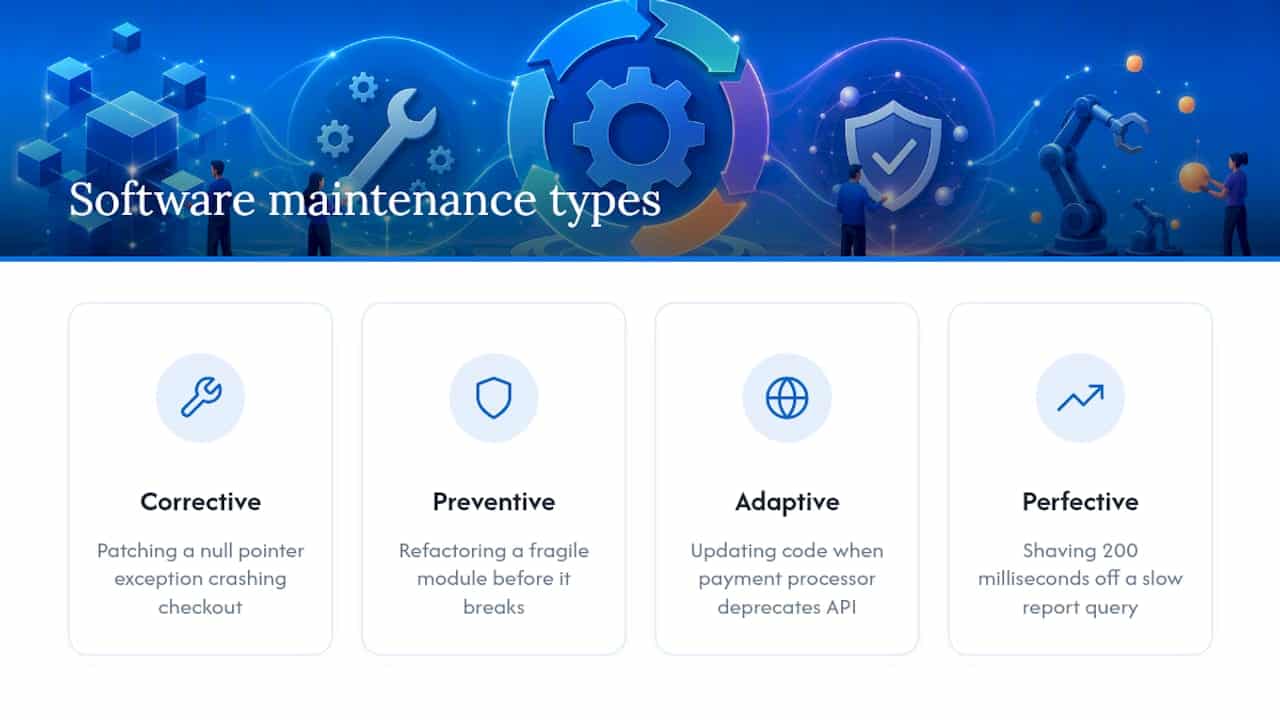
Every maintenance plan has to account for four categories, and conflating them is how backlogs get mismanaged. Corrective maintenance fixes defects, like patching a null pointer exception crashing checkout. Preventive maintenance addresses problems before they surface, such as refactoring a fragile module before it breaks under load. Adaptive maintenance keeps the system compatible with a changing environment, like updating code when a payment processor deprecates an API version. Perfective maintenance improves usability or performance without fixing a bug, such as shaving 200 milliseconds off a slow report query.
Prioritization comes down to weighing risk against effort. A production-down corrective fix always jumps the queue. Preventive and perfective work competes for the same sprint capacity, so triage rules matter: a two-line security patch outranks a UI polish item nine times out of ten, but a repeated root cause on your incident log should outrank both.
Integrations complicate this further. When you depend on commercial off-the-shelf software or third-party APIs, your priorities shift with someone else’s release calendar. Monitor supplier SLAs and vendor deprecation notices the same way you monitor your own error logs, because a missed vendor announcement can turn into an emergency adaptive fix.
The most consistent guidance from maintenance planning research is to reserve 15% to 20% of engineering capacity for preventive and perfective work on a rolling basis, rather than treating it as leftover time.
How Much Does Software Maintenance Cost?
Maintenance budgets tend to follow one of four models. A fixed retainer suits teams that want budget predictability and steady vendor availability. Time and materials fits unpredictable workloads where scope shifts monthly. Per-incident billing suits low-traffic systems that rarely need attention but still need a support path when something breaks.
Treat any percentage-of-development-cost figure as a starting estimate, not a rule.
Cost drivers to model explicitly:
- System criticality and acceptable downtime
- Number and fragility of integrations
- Security and compliance posture (especially in healthcare or finance)
- SLA targets and response-time commitments
- Platform and infrastructure complexity
- Legacy code volume and documentation quality
Your budget line item should include monitoring tools, staffing (in house or augmented staff), a contingency reserve for emergency fixes, and licensing renewals. Skipping the contingency line is the single most common budgeting mistake IT leaders make, because it forces emergency spend to come from a different department’s budget mid-year.
How Do You Build a Software Maintenance Plan Step by Step?
Building the actual document follows a sequence you can reuse for every system you own.
- Audit and build a risk register. Inventory every component, dependency, and integration. Log known technical debt, outdated libraries, and usage patterns. This becomes your baseline, and you cannot prioritize what you have not measured.
- Define objectives and KPIs. Agree on uptime targets, mean time to repair (MTTR), mean time between failures (MTBF), and an error budget that trades off stability against feature velocity. Write these into your SLAs before you need them in a dispute.
- Design the schedule. Map patch cycles, release windows, and maintenance blackouts against business calendars. A retail system should never schedule a risky deployment during peak season, no matter how overdue the update is.
- Assign roles and responsibilities. A simple RACI clears up more confusion than any policy document:
- Responsible: the engineer executing the fix or update
- Accountable: the team lead who owns the outcome
- Consulted: application support engineers monitoring infrastructure health
- Informed: product owners and affected business stakeholders
Pair this with an on-call rotation that has a named primary and backup, never a shared inbox nobody owns.
- Set release and rollback gates. Before any release ships, confirm:
- Regression tests pass against the full suite
- Staging environment mirrors production configuration
- Smoke tests run immediately post-deploy
- A rollback script exists and has been tested, not just written
- Run incident response and post-mortems. Every incident above a defined severity threshold gets a blameless root cause analysis and a tracked corrective action, not just a Slack thread that fades by Friday.
- Plan migration and retirement early. Decommissioning a system needs parallel runs, verified data conversion, and a documented rollback path in case the new system underperforms. Waiting until the retirement date to plan this step is how data gets lost.
Pro Tip: The single habit that makes maintenance repeatable is documenting every release, patch, and configuration change the moment it happens, not at the end of the sprint. Teams that defer documentation lose the context that makes root cause analysis fast instead of forensic.
How Often Should You Patch, Review, and Upgrade Software?
Cadence depends on system risk, but a defensible starting template looks like this:
| Activity | Recommended Cadence |
|---|---|
| Security patches | Within hours of critical CVE disclosure |
| Dependency updates | Monthly, or on vendor release |
| Performance reviews | Quarterly |
| Technical debt sprints | Every 4 to 6 sprints |
| Architecture review | Annually |
High-availability systems, think payment processing or clinical platforms, need tighter windows across the board, sometimes patching security issues same-day. Low-risk internal tools can stretch review cycles further without meaningful exposure. COTS integrations deserve their own line: track vendor release notes and deprecation timelines separately, since their cadence is outside your control.
Your template pack should include a maintenance plan document, a calendar spreadsheet mapping these cadences to actual dates, and runbooks for common incident types. Version the plan itself. Every revision needs a change log entry stating what changed and why, so a new hire can understand the plan’s history without asking around.
What Processes and Tools Keep Maintenance Repeatable?
A minimum-process checklist protects you from human error at the worst possible moment:
- Documented version control policy and branching strategy
- Formal change approval workflow, even a lightweight one
- Deployment gating tied to automated test results
- A tested, documented rollback procedure for every release
Tool categories map directly to these processes. CI/CD platforms automate gated releases and cut deployment errors. Application performance monitoring (APM) tools catch degradation before users file a ticket. Log aggregation tools turn scattered errors into a searchable incident trail. Vulnerability scanners flag exposed dependencies before attackers find them. IT service management (ITSM) or ticketing platforms give you the aged-ticket data your KPIs depend on.
Whether your team runs trunk-based development or a release-branch strategy, configuration management has to stay synchronized with your development workflow, or your maintenance plan will drift from what production actually runs.

Which KPIs Prove Your Maintenance Plan Is Working?
Track a short list, not a dashboard nobody reads: MTTR, MTBF, change lead time, deployment frequency, percentage of emergency changes, SLA compliance rate, and aged ticket counts.
Reporting rhythm should scale with urgency:
| Audience | Cadence | Content |
|---|---|---|
| On-call team | Daily | Active alerts, open incidents |
| Operations lead | Weekly | Ticket trends, SLA status |
| Executives | Monthly | Uptime summary, cost variance |
| Architecture team | Quarterly | Technical debt review |
An error budget, the allowable amount of unreliability before you halt new feature work, gives you a data-backed way to say no to a risky release without it becoming a political argument.
Which Standards Should Your Maintenance Plan Reference?
Citing recognized standards turns a maintenance plan from an internal memo into a document procurement teams and auditors will actually accept. ISO/IEC/IEEE 14764 defines the foundational maintenance processes and vocabulary most plans should structure around. For mission-critical or regulated systems, NASA’s SWE-105 requirement lists minimum content: process implementation, problem and modification analysis, migration, retirement, software assurance, and risk assessment. Where medical software is involved, IEC 62304 governs the software life cycle on top of these.
Your checklist should map each section to its justification:
- Process implementation → ISO/IEC/IEEE 14764
- Problem and modification analysis → SWE-105
- Testing and verification → SWE-105 assurance requirements
- Migration and retirement → SWE-105, NASA volume guidance
- Risk assessment → both standards
- Documentation and licensing updates → NASA guidance
A maintenance plan that cites its standards isn’t bureaucratic overhead. It’s the difference between a document an auditor trusts on sight and one they interrogate line by line.
Create separate volumes when a system has genuinely distinct operational elements, and always link back to your existing configuration management or risk registers instead of duplicating them.
What Do Maintenance Team Leads Wish They’d Negotiated Earlier?
Negotiate post-launch support terms before the contract closes, not after the first outage. A short warranty period followed by silence leaves you exposed exactly when a new system is least stable. A named point of contact and a documented escalation path, agreed at signing, consistently prevents small issues from becoming production incidents, because everyone already knows who to call and how fast they’ll respond.
If you’re building your own case studies to strengthen this section, add real examples and credentials here. Proof points from your own incident history carry more weight than any generic advice.
How Seattle Software Developers Supports Your Maintenance Plan
Seattlesoftwaredevelopers gives you an alternative to piecing together maintenance coverage from a warranty clause and whoever’s available internally. Where many teams default to ad hoc fixes after launch, Seattlesoftwaredevelopers builds maintenance into the engagement from the start, with retainers, staff augmentation, and security-focused support sized to your system’s actual risk profile, not a generic percentage.

If you’re staring at a legacy system with undocumented integrations and no clear owner, a maintenance audit is the practical starting point: Seattlesoftwaredevelopers reviews your current setup, identifies the highest-risk gaps, and customizes a maintenance plan template around what your system actually needs, from healthcare compliance requirements to financial platform uptime targets. Reach out to explore a partnership and get a maintenance audit scoped for your system before your next renewal cycle forces the conversation.
Further Standards and Templates to Reference
Strengthen your own plan’s authority by citing these directly:
- ISO/IEC/IEEE 14764 for foundational maintenance process definitions
- NASA’s SWE-105 requirement for minimum plan content on high-assurance systems
- Post-launch support essentials for structuring bug fixes, monitoring, and release schedules
Use the plan DOCX for governance language, the calendar spreadsheet for scheduling, and the runbook samples when training new on-call staff.
Frequently Asked Questions
What’s the difference between application support and application maintenance?
Application support handles day-to-day user issues and incident triage, while maintenance covers the underlying code changes, patches, and upgrades that support tickets often reveal are needed. They overlap constantly but require different skill sets and different SLA structures.
How is a maintenance plan different from a post-launch support agreement?
A maintenance plan is the internal governing document covering schedules, roles, and standards. A post-launch support agreement is the contractual commitment between you and a vendor or partner that specifies response times and severity definitions, often referencing the maintenance plan itself.
What’s a reasonable software maintenance budget for a first-year system?
A common starting range is a moderate percentage of the original development cost annually, adjusted up for compliance-heavy or integration-dense systems and down for simple, low-traffic tools.
How often should the maintenance plan itself be reviewed?
Review the full document at least annually, with a lighter quarterly check against your KPI trends to catch drift between what the plan says and what your team is actually doing.
Sources
- ISO/IEC/IEEE 14764 (standard) — ISO
- SWE-105 – Software Maintenance Plan — NASA Software Engineering Handbook
- How to Build a Software Maintenance Plan That Actually Works | Modernization Intel
- Why Post-Launch Support Matters More Than the Build in Custom Software — Empyreal Infotech
- What Post-Launch Software Support Should Actually Include — DevelopnSolve
Recommended
- Software Development For All Businesses | Seattle Software Developers
- The Step-by-Step Process of Custom Software Development | Seattle Software Developers
- Enterprise Software: Enhancing Collaboration and Communication | Seattle Software Developers
- Mobile App Development Process | Seattle Software Developers